aviqo Get a quote
POS hardware · made for FrameX

Checkout,anywhere.

Aviqo makes the terminals FrameX runs on: a handheld that prints receipts at the table, and a countertop station built for the rush.

Aviqo Handheld POS terminal

Orders today EXAMPLE

9AM12PM3PM6PM

Table 6 EXAMPLE

Paid
Receipt printed at the table
PRINTBuilt-in printerReceipts straight from the handheld
TOUCHAndroid touchscreenFamiliar for staff on day one
SIMMobile data readyKeep trading when Wi-Fi drops
FRAMEXShips set upHardware and software, one team

The devices

Two terminals. Pick one or run both.

Use the countertop as your main till and add handhelds for table service, queues and pop-ups. Every sale lands in the same FrameX account.

Handheld

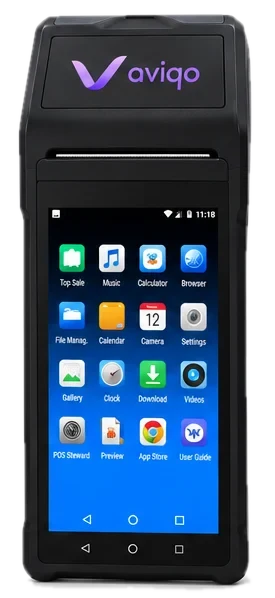
Aviqo Handheld

An Android POS terminal with the receipt printer built into the top. Take the order at the table, take payment, and hand over the receipt without walking back to the till.

  • PrinterBuilt-in thermal receipt printer with a top-loading paper roll
  • ScreenFull Android touchscreen with on-screen navigation
  • ConnectSIM slot for mobile data, plus Wi-Fi
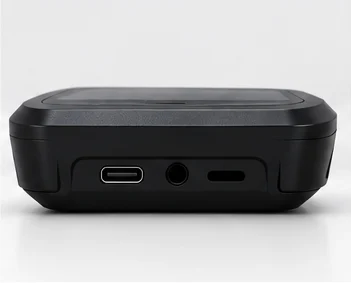
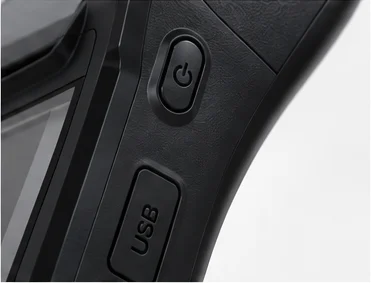
  • PortsUSB-C charging, audio jack and a side USB port
  • GripTapered body with a textured back that sits well in one hand
Ask about the Handheld Try the Handheld demo →
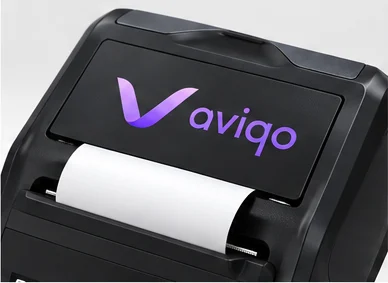
Receipt paper feeding from the top of the handheld
Receipt slotPaper feeds out the top edge
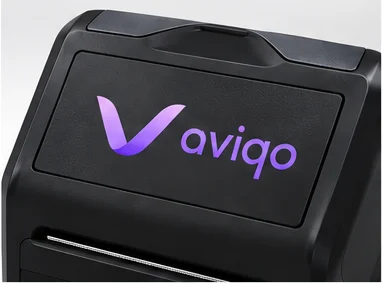
Printer lid with Aviqo logo
Printer lidFlip it open to change the roll
Bottom edge with USB-C and audio jack
Bottom edgeUSB-C and audio jack
Side power button and USB port
Side controlsPower button and USB port
Countertop

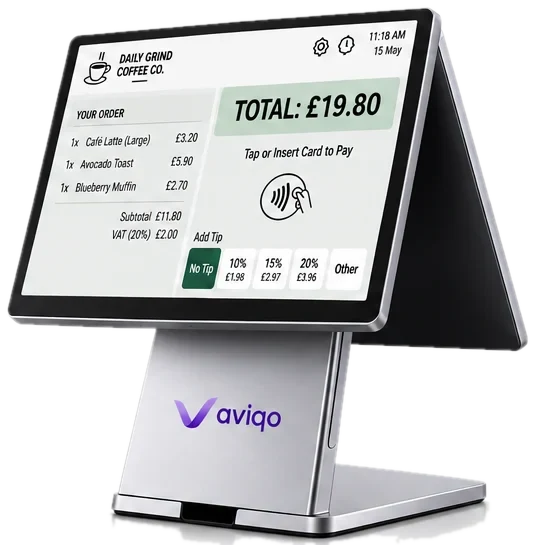
Aviqo Countertop

A wide touchscreen on a solid aluminium stand. Big enough to show the full order, the total and tipping options at a glance, and steady through a full day of rush hours.

  • ScreenWide, bright touchscreen sized for full order lists
  • StandBrushed aluminium column on a weighted base
  • AudioRear speaker grilles for order and payment alerts
  • ProfileSlim side profile that fits narrow counters
  • SoftwareReady to run FrameX checkout out of the box
Ask about the Countertop Try the Countertop demo →

Try me

Ring up an order. Right here.

This is the Aviqo Handheld running a café checkout. Tap items to build an order, take payment, and watch the receipt print out of the top.

  1. Tap items on the screen to add them to the order
  2. Press Charge to send the total to the payment screen
  3. Drag the card onto the device, or press Tap card
  4. Grab your receipt as it prints, then start a new order
Get one for your shop
9:41
Aviqo CaféRuns on FrameX
TABLE 4

Tap an item to start an order

0 itemsRM 0.00

Demo only · no real payment is taken

Aviqo + FrameX

The hardware is Aviqo. The software is FrameX.

Both come from the same team, so you get one quote, one setup and one number to call. Your devices arrive with FrameX installed and ready to sign in.

Visit FrameX →
Aviqo
The terminalsHandheld and countertop devices: printer, screen and connectivity
FrameX
The softwareMenus, orders, checkout and the sales you see at the end of the day
Together
One setupDevices delivered with FrameX loaded and your shop details in place

Who it's for

Built for places with a queue.

Cafés

Ring up orders at the counter and print the ticket in the same tap.

Countertop

Restaurants

Take orders and settle the bill at the table, receipt included.

Countertop + Handheld

Retail shops

A fixed till for the counter, a handheld for busy weekends.

Countertop + Handheld

Pop-ups and events

No counter, no cables. Mobile data keeps you trading anywhere.

Handheld

Delivery and pickup

Confirm and print orders at the door or the collection point.

Handheld

Food trucks

One compact device for the order, the payment and the receipt.

Handheld

How ordering works

From first message to first sale.

  1. Message us

    Tell us what you sell and how many tills or staff you have.

  2. Get a quote

    We suggest the right mix of devices and send a price.

  3. We set it up

    FrameX goes on each device with your menu or products loaded.

  4. Start trading

    Devices arrive ready. Switch on, sign in, ring up the first order.

FAQ

Questions we get a lot.

Do the devices come with FrameX installed?

Yes. Every Aviqo device is set up with FrameX before it ships, so you only need to sign in.

Can I use a handheld and a countertop together?

Yes. Both connect to the same FrameX account, so orders and sales from every device show up in one place.

Does the handheld work without Wi-Fi?

It has a SIM slot, so you can add a data SIM and keep trading on mobile data when there's no Wi-Fi.

What paper does the handheld printer use?

Standard thermal receipt rolls. Open the lid on top, drop in a new roll and close it.

How much do the devices cost?

Pricing depends on the number of devices and the setup you need. Send us a message and we'll reply with a quote.

Get a quote

Tell us about your shop.

Send a few details and we'll reply on WhatsApp with the right devices and a price.

Opens WhatsApp with your message filled in. Nothing is stored on this site.